
Simple Mode
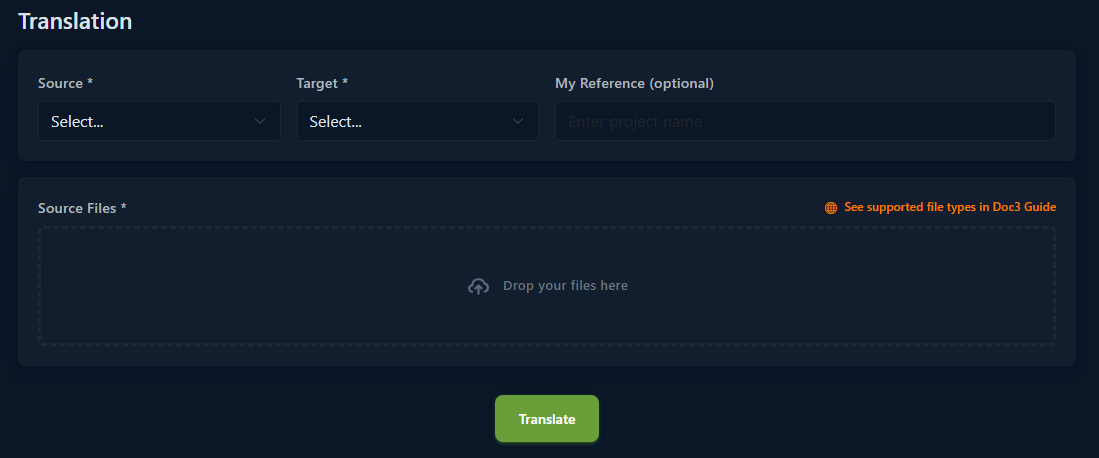
Doc3 offers a Simple Mode designed for lightning-fast, fully automatic AI translation. It's the ideal choice when you need to quickly translate one or more documents without any complex setup.
The AI engine handles all the work for you. From file analysis to delivering a high-quality, complete translation – everything happens in seconds. Just upload your files, and you're done.
Key Features:
Fully Automatic: The system recognizes the text and performs the translation on its own.
Zero Configuration: There's no need to create a project, manage glossaries, or deal with any technical settings.
How to Translate in Simple Mode
Translating is a matter of a few clicks:
Source: In the dropdown menu, select the language you want to translate from.
Target: Select the target language you want to translate to.
My Reference (optional): You can enter a custom name or reference for the translation (e.g., "Marketing Brochure EN-DE").
Source Files: Drag and drop one or more files into the designated area, or click on it to select your files manually.
Translate: Click the green Translate button.
After a brief processing time, your translation will be ready.
Tip: If you need detailed control over the translation process, project management, glossaries, or advanced AI suggestions, you can switch to Advanced Mode.
You can select the working mode in the upper right corner.

Simple Mode
The AI engine handles everything. Get a complete, high-quality automatic translation in seconds. No configuration needed, just pure results.
Advanced Mode
You're in the driver's seat. Manage your translation project from start to finish. Leverage powerful AI suggestions, manage glossaries, and ensure perfect consistency. This is translation your way.